Team Builder
The Team Builder turns your evaluation results into teams. Run a live draft yourself, picking players with their full stat lines in front of you, or let the auto-draft build balanced rosters in one click — or mix the two: lock in the picks you care about and let the auto-draft fill in the rest.
Sessions
All team building happens inside a Session. A session holds its own set of teams, its own draft board, and its own settings (roster size, player-pool filter). An evaluation can have as many sessions as you like, which is useful for:
- One session per division: if one evaluation covered multiple groups (see Groups), create a session per group and build each division's teams separately.
- What-if scenarios: clone a session and try a different team count, roster size, or keeper situation without losing the original.
- Mock drafts: practice runs before the real draft night.
One session is active at a time — that's the one that opens when you enter the Team Builder. When a session's teams are final, lock the session to make it read-only; nothing can change until you unlock it.
The Draft Board
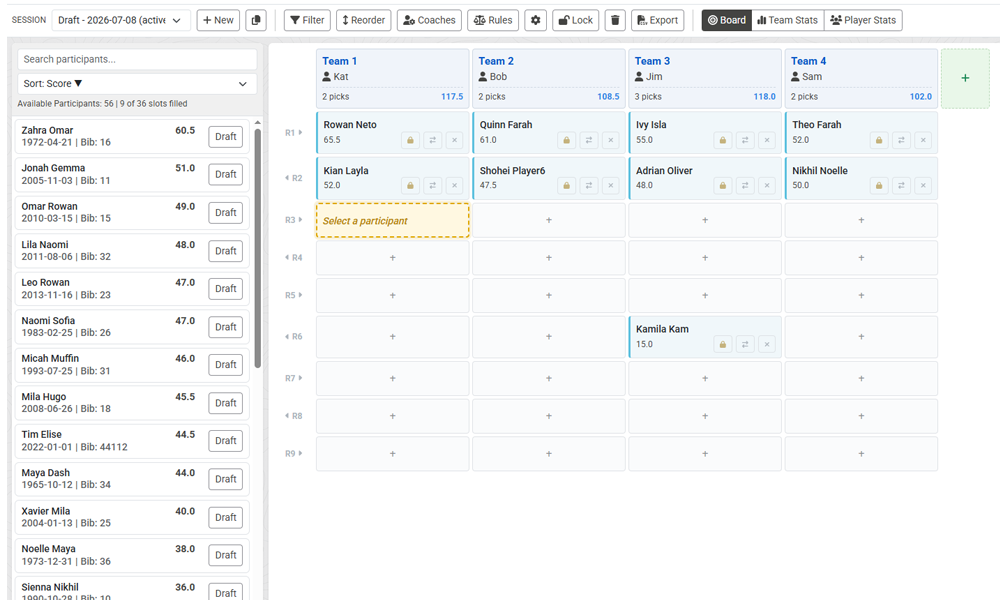
The board is laid out like a real draft: teams across the top, rounds down the side. Each team can hold one pick per round, and each player can be drafted only once per session. You can assign a coach to each team, and move or swap picks between teams as plans change.
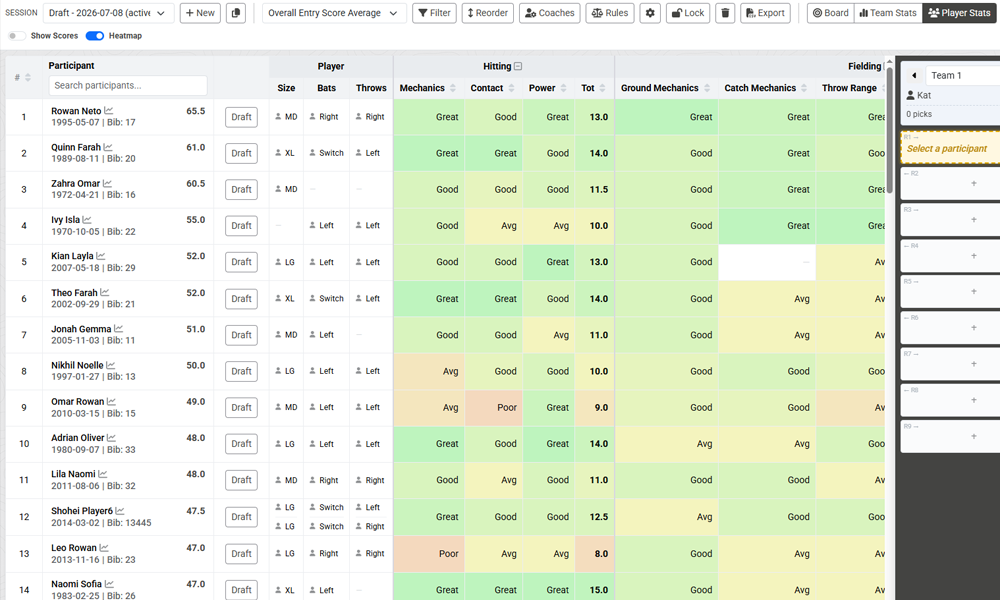
Alongside the board, the available player list shows every eligible player ranked by score. Flip to the Player Stats view to compare available players across every category and attribute — the same color-coded stats grid used in reports — before you make the call.
Filtering the Player Pool
Each session can filter its eligible player pool by group, tags, or age range. When a filter is on, only matching participants appear in the available list and can be drafted — a player outside the filter simply isn't part of that session's draft.
This is one of the main reasons sessions exist: filter one session to "U10 Boys" and another to "U12 Boys", and you can build both divisions' teams from a single combined evaluation without players crossing over.
Locking Picks
Any pick on the board can be locked to its team and round. A locked pick is frozen: the auto-draft will never move or replace it — it builds the rest of the teams around your locked picks and counts them toward each team's balance. Two common ways to use this:
- Pre-lock, then auto-draft: place the picks you already know — "my kid on my team," keepers, a coach's assistant's kid in round one — lock them, and let the auto-draft fill every remaining slot fairly around them.
- Post-lock, then re-run: after an auto-draft, lock the placements you like and re-run. Only the unlocked picks get replaced, so each pass refines the board instead of starting over.
Draft Rules
Rules capture the real-world constraints of youth-sports drafts. There are two kinds:
- Pairing rules (player ↔ player): keep two players together (siblings, carpools) or apart (players who shouldn't share a team). Each rule can be a hard requirement that must be honored, or a preference the auto-draft tries to satisfy. You can attach a short reason so next season's you remembers why the rule exists.
- Coach rules (player ↔ coach): a preferred coach the player should land with if possible, or an avoid rule that keeps a player off a specific coach's team. Avoid rules are treated as hard constraints — they cover serious situations and are never traded away for balance.
Rules belong to the evaluation, so every session in it honors the same list. They deliberately do not carry over between evaluations — sensitive "keep these two apart" decisions should be re-confirmed each season rather than silently following players year after year.
Auto-Draft: Balanced Teams in One Click
The auto-draft fills every open roster slot using your evaluation scores. It respects everything above: locked picks stay put, hard rules are always honored, and the player-pool filter decides who's eligible.
Balance is multi-dimensional, not just overall. The auto-draft doesn't only even out each team's total score — it works to spread talent evenly across each scored category (hitting, fielding, pitching…), so one team doesn't quietly end up with all the pitchers. Only attributes that count toward the ranking (Score and Scored Measurement types) feed the balance; informational data is ignored. If your form has fewer than three scored categories — say everything lives in one big category — the auto-draft automatically balances across the individual scored attributes instead, so it still spreads skills and not just totals.
Before anything is committed you get a preview: how many players are eligible, whether everyone fits the available roster spots, which hard rules are in play, and any players that couldn't be placed. Nothing changes on the board until you accept.
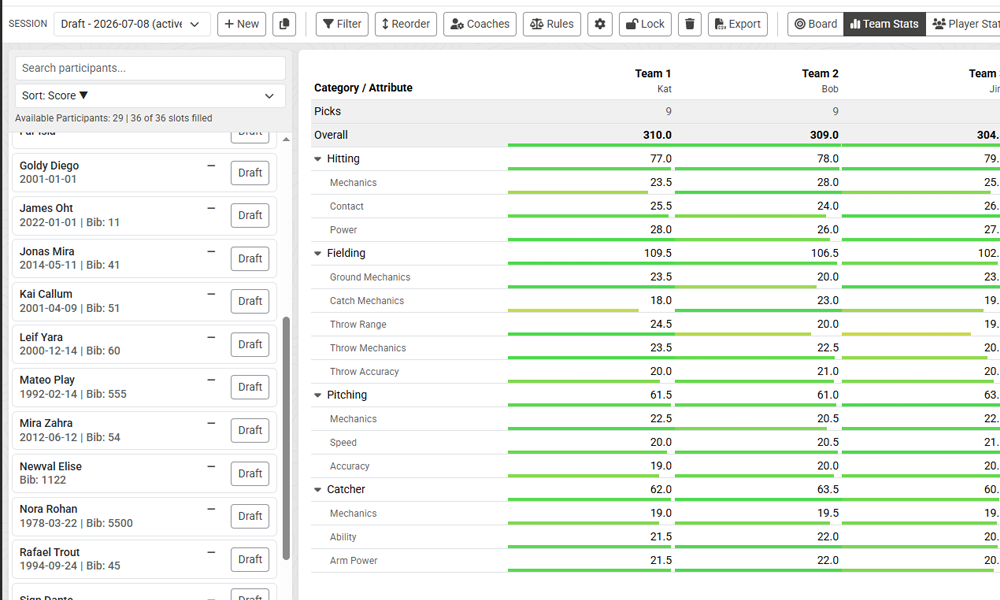
Afterwards, prove the teams are fair with the team stats breakdown — each team's totals by category and skill, side by side. Adjust anything you disagree with by hand (lock those picks if you plan to re-run), and when rosters are final, lock the session and export the teams to CSV to share with your league.